

In September of 2025 I started tinkering building an iPhone app. Before this amazing AI wave I thought I would need to retire, learn Swift UI and spend the better part of a few months learning the basics of how to build an iOS app. Well it turns out I was wrong and I have now built 5 iOS apps that are published on the App Store.
It all started with an idea my sister Nevine and I discussed.
My photo library has tens of thousands of photos in it, and every attempt to clean it up died the same way: I would open Photos, scroll for ten minutes, feel overwhelmed, and close it. What if instead of looking at everything, I only looked at the photos taken on this day across all the years? Today’s date, every year I have owned an iPhone. A small, finite pile. Something I could actually finish over coffee.
So I built it. And the surprising part was not the cleanup. It was that looking at one day across all those years connected me to my memories and my past in a way that scrolling never had. Kids at every age. Trips I had half forgotten. That turned it from a chore into something I looked forward to, and it’s why I kept going: widgets so the day’s memories are on my Home Screen, a morning notification with a photo from that day, and sharing so I could send those memories to family.
That first app was an early experiment in building with AI. I used Cursor and Claude Opus 4.5 and 4.6, and I learned a lot about what worked and what didn’t. At the start of 2026 I moved to Codex and Claude Code as my main tools, got faster and better at this, and the apps started coming out quicker. Somewhere along the way I started calling it Omar’s Software Factory.
Here is what came off the factory floor. All four are on the App Store, all four are built for iOS 26, and none of them have accounts, ads, or tracking. Details for each live at omarknows.app.
On This Day
On This Day is the app that started it all. Open it and you see every photo and video you took on today’s date, across every year. Swipe right to keep, swipe left to delete. Deletes are queued until you’re done, and at the end of a session it tells you how much space you actually got back.
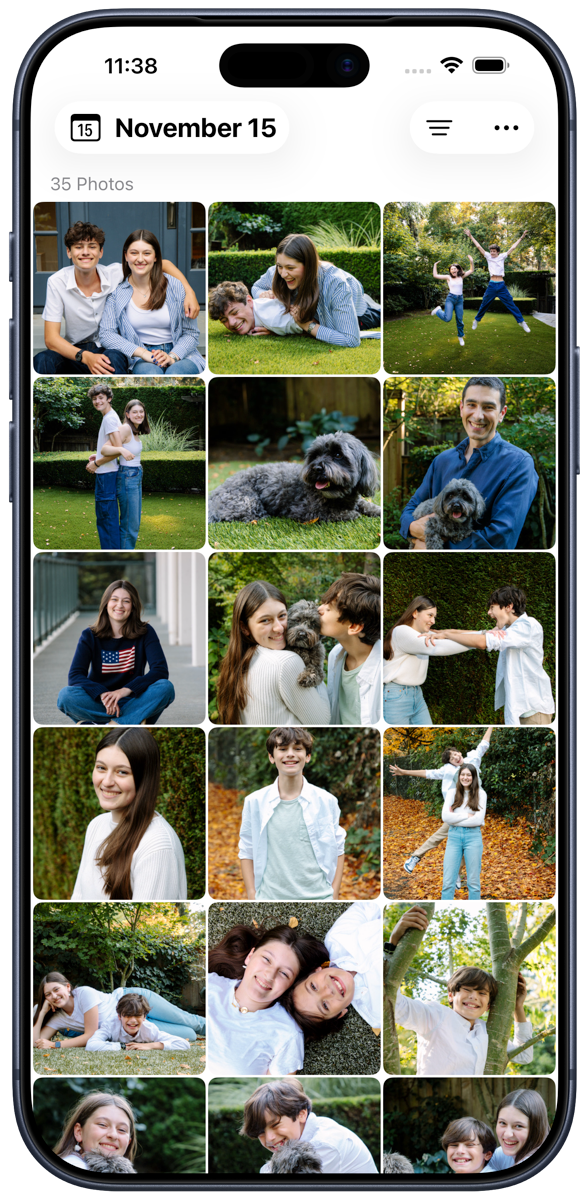
The daily part is what makes it work. You don’t clean up your library. You clean up one day, and tomorrow there’s a new day waiting. There’s a streak, a calendar with a dot on every day you’ve finished, and a random day button for when today is thin.
The parts I added because I kept wanting them:
Widgets in three sizes that show today’s memory and roll over at midnight.
A morning notification with a photo from this day in a past year. It’s a nice way to start the day.
Sharing that includes the date and the place the photo was taken. Sending a “ten years ago today” photo to Lora or the kids is my favorite part.
Group by Year in the grid, so you can jump straight to 2014.
Live Photos and video play inline, EXIF metadata is a tap away, and you can add the whole day to an album.
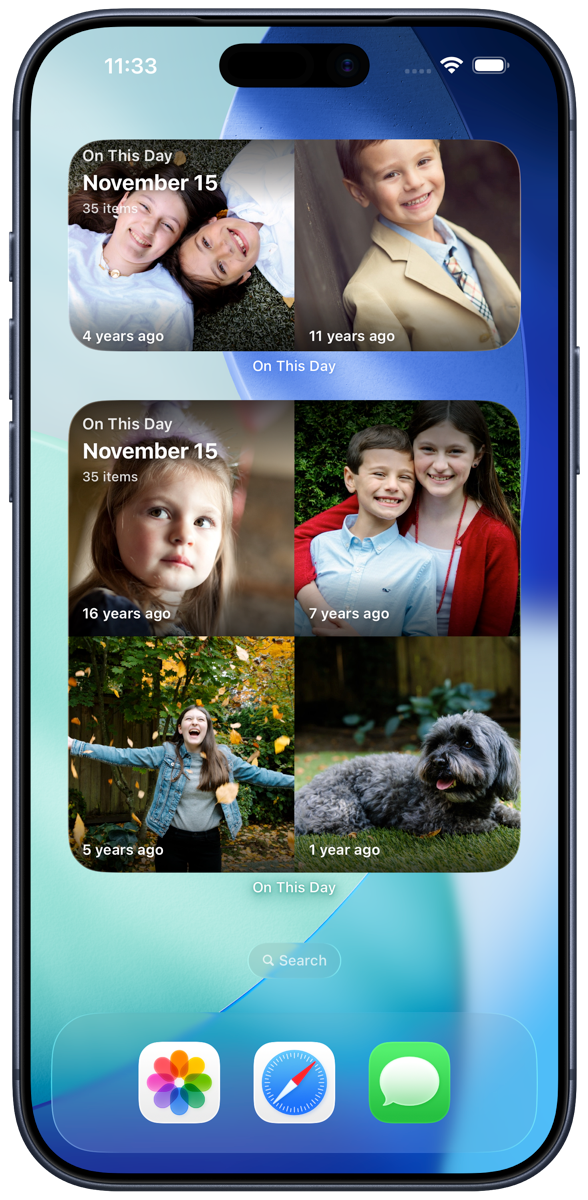
Everything happens on your phone. Photos never leave the device, and the only thing that syncs through iCloud is your keep and delete decisions so you don’t see the same photo twice.
On This Day is free until you’ve reviewed seven days. After that it’s $1.99 a month, $19.99 a year, or $59.99 for life, which unlocks unlimited days, the widgets, and custom app icons. iPhone only for now.
Tallyday
I wanted a counter for the things in life that don’t have a natural log. Days since I got married. Days since I started at Microsoft. Days since I started Strength Training. So I built Tallyday.
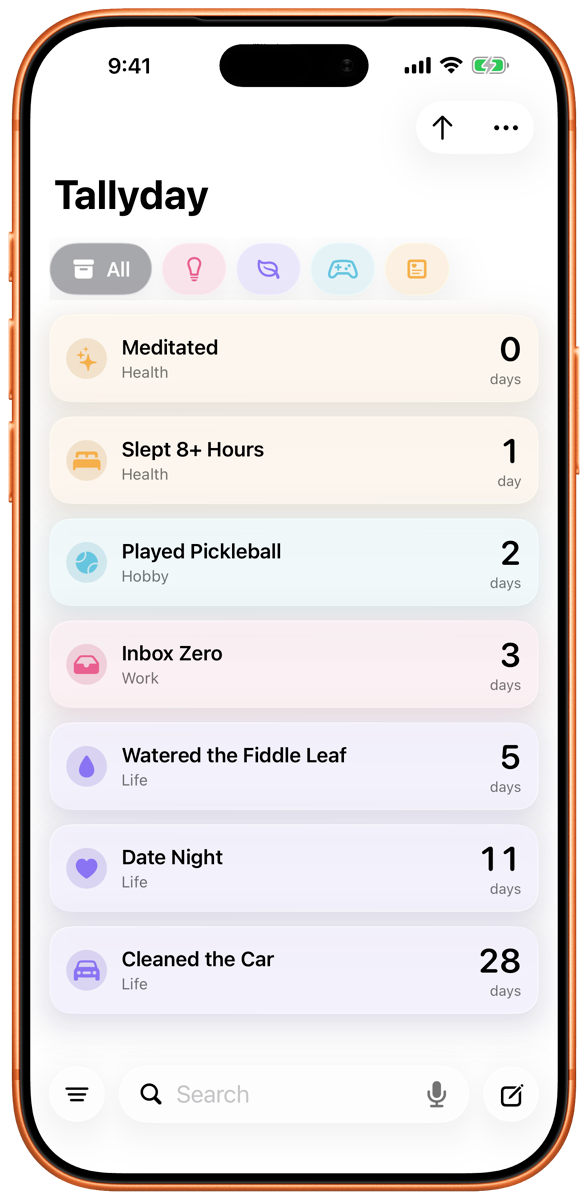
Each counter is a card with a name, an icon, and a color. Tap it, hit Reset, and you’re back to day zero. Tap the number and it flips from total days to years, months, and days. It counts down too: set a date for a trip or a launch, watch the days tick away, and when the day arrives it celebrates and then quietly starts counting up.
There are widgets (one counter, two side by side, or a list), reminders on whatever cadence you like, categories, archive, and search. Your counters sync through your own iCloud, so they show up on your iPad without an account. You can share a milestone as a card, or send it as a link. And a fun detail: the link never touches a server. The milestone lives inside the URL itself, so nothing about your counter is logged anywhere.
Tallyday is free. There’s a tip jar if you want to say thanks, and tips unlock nothing but my gratitude. iPhone and iPad.
Share Times
Every week I have some version of this exchange: “Do you have time Thursday?” “Sure, what works?” “How about 2?” “Is that your 2 or my 2?”
Share Times is my answer. It shows your real calendar as a day timeline, you tap or drag on the empty spots to mark when you’re free, and it produces a clean block of text you can paste into Messages, Mail, or Slack.
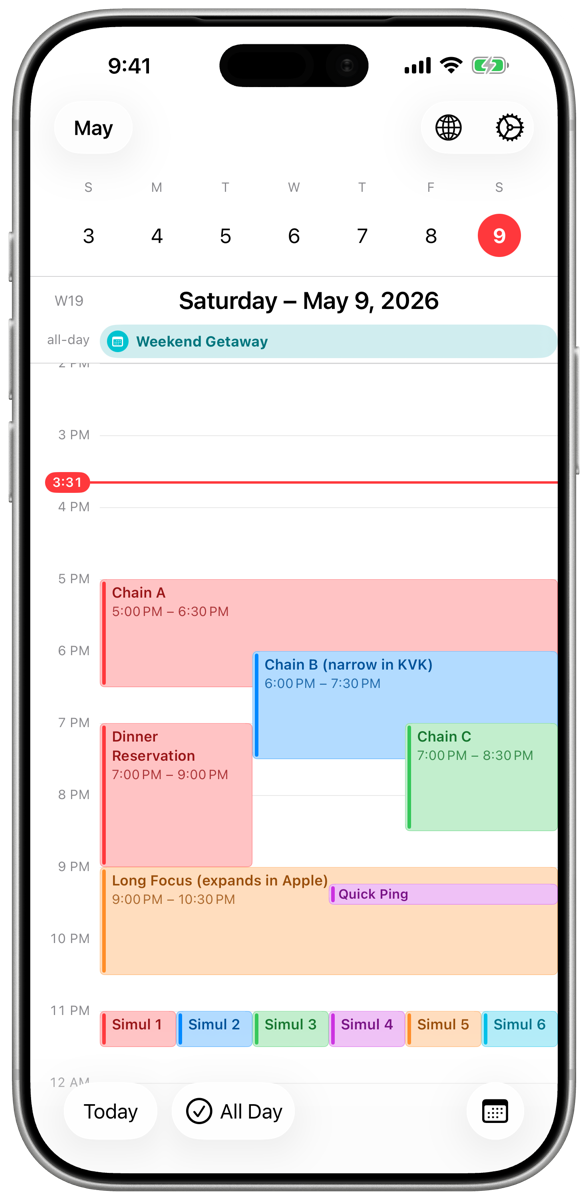
The killer feature is time zones. Add the recipient’s time zone and Share Times converts every slot into their local time, so the message reads correctly on their end. No mental math. It handles 15, 30, or 60 minute blocks, working hours, and it skips weekends by default. Recipients can tap the times and see them in their own calendar.
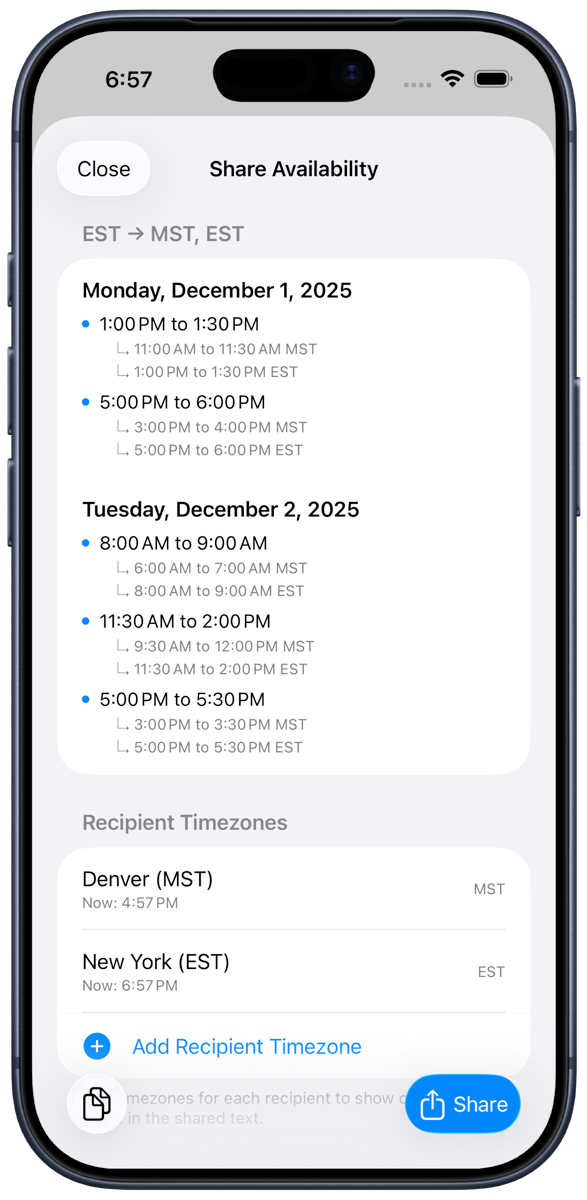
There’s also a three-day calendar widget: a clean, glanceable view of the next few days that looks great with iOS 26.
Share Times is free for a single calendar. Pro is $4.99 a year or $19.99 for life and adds multiple calendars, recipient time zones, the widgets, and lets you remove the “sent with Share Times” line. iPhone only.
Netgleam
Netgleam is the newest one, and it came from travel frustration. Hotel Wi-Fi that connects but doesn’t work. Airport lounges where the captive portal never pops up. Airplane Wi-Fi that says it’s fine while nothing loads. I wanted one app that could tell me plainly what my connection was actually doing.
Netgleam does that. Open it and you get a status card: online or not, Wi-Fi or cellular, link quality, IPv4 and IPv6, whether you’re on a metered connection, whether traffic is going through a VPN or Private Relay. If it detects a captive portal, there’s a one-tap button to open it. I tested that one live on lounge Wi-Fi at JFK and on Alaska’s inflight Wi-Fi, and both were the kind of networks that fool Apple’s built-in detection.
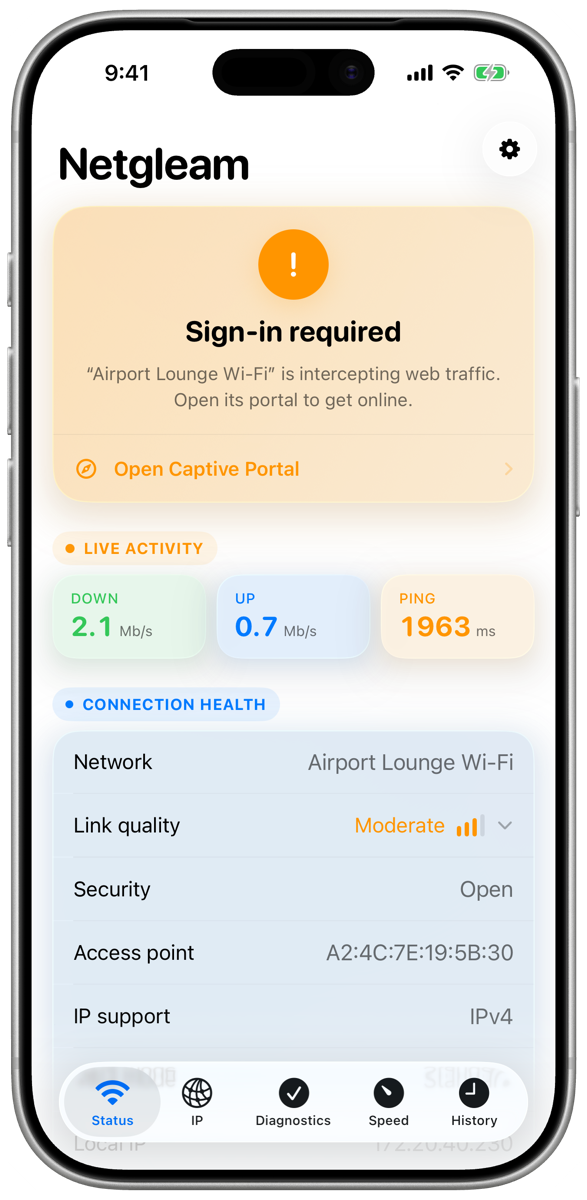
The other tabs:
Public IP shows what the internet sees about you: address, ISP, ASN, approximate location, and whether you’re routing direct or through a tunnel.
Cellular shows every line on the phone (dual SIM and eSIM included), radio type, and registration state. It only shows what iOS actually exposes, and I decided early on not to invent signal bars or labels Apple won’t give third-party apps.
Diagnostics runs eight timed checks (DNS, TCP, TLS, first byte, and so on) and gives you a plain-language verdict with next steps, not a wall of output.
Speed test is a native Swift port of Cloudflare’s open source adaptive speed test methodology. Same endpoints, same approach, no web view.
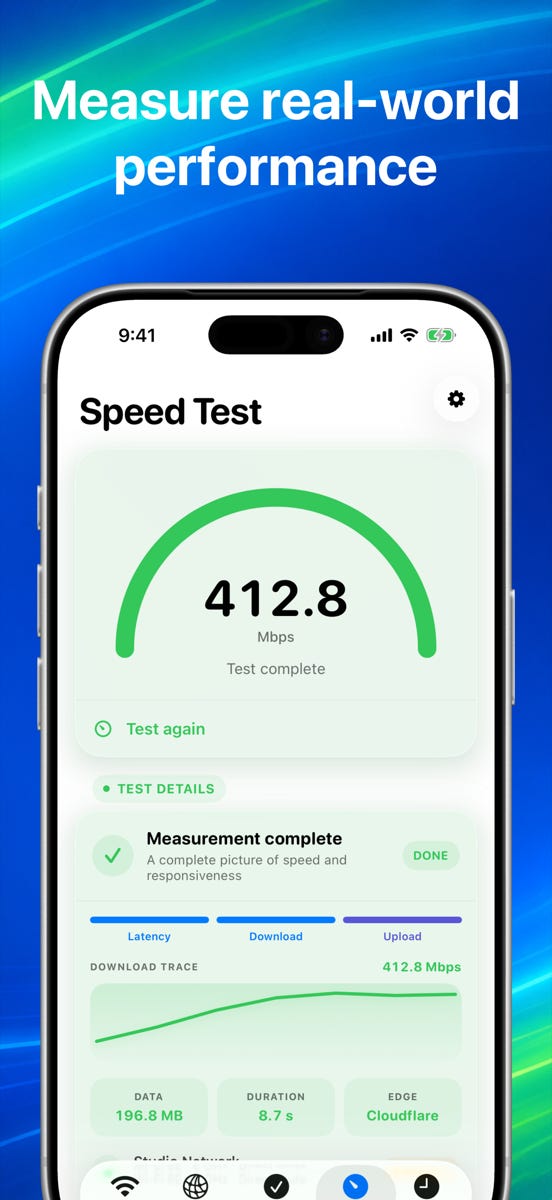
There’s a private connection timeline that records handoffs and IP changes, and history stays on the device.
Netgleam is $0.99, one time. iPhone and iPad.
What I learned
The photos app took about three months of nights and weekends in the fall of 2025 to get to something I loved using, and then another six months of polish and App Store readiness before I shipped it. Tallyday went from first commit to the App Store in a day and to a solid 1.0 in a couple of weeks. Netgleam went from a design spec to live on the App Store in about twelve days.
That’s not because the later apps are simpler. It’s because the tools got dramatically better and I got better at using them. Codex and Claude Code write the code, review each other’s pull requests, run the tests, generate the App Store screenshots, and handle the release pipeline. My job became deciding what to build, using it every day, and being picky about the details.
The single biggest lesson: build the thing you want to use. On This Day is on my Home Screen because I open it every morning. Netgleam exists because I was annoyed in an airport. That’s a much better filter than any market research.
If you try any of these, I’d love to hear what you think. Every app has a support email that goes to me, and I read all of it. And if you’ve got an idea for something small and useful that should exist on your iPhone, tell me in the comments. The factory has capacity.
Sharetime should be a feature in MS Outlook especially as have such geo diverse teams in Microsoft!
These are all awesome nice job! Inspiring story and helpful apps. I’m building a bunch of stuff myself so great to hear your journey.